Research record · make.com pricing FAQ
Make review: credits replaced operations, and the free plan is 1,000 a month
Make's pricing FAQ says credits are the billing unit, most actions cost one credit, and the free plan includes 1,000 credits a month. Dollar prices for Core, Pro, and Teams were not in the text we could read. November 18, 2026.
Verdict. The FAQ explains credits, a 1,000-credit free plan, and named paid plans. It did not show us a dollar price for Core, Pro, or Teams.
| What | Detail |
|---|---|
| Product | Make |
| What was checked | make.com pricing FAQ |
| Result | The FAQ explains credits, a 1,000-credit free plan, and named paid plans. It did not show us a dollar price for Core, Pro, or Teams. |
- Sources checked
- Researcher
- We Tried That research desk
- Pages read
- make.com pricing FAQ
- Method
- Read Make's public pricing FAQ on November 18, 2026. No scenario was built and no card was charged.
- What the sources said
- The FAQ explains credits, a 1,000-credit free plan, and named paid plans. It did not show us a dollar price for Core, Pro, or Teams.
Make is an automation product. You build a scenario that watches one app and writes to another. The pricing question is no longer “how many operations” if you are reading the current FAQ. Make says credits are the unit. This note explains the rules that were actually on the pricing FAQ on November 18, 2026. We did not build a scenario or enter a card.
Open Make’s pricing page for the dollar amounts this article does not contain. We Tried It All already compares Make with Zapier and n8n. This page does not redo that product bake-off. It is the credit rules, the free allowance, and the cancellation terms. A shortlist that pairs Make with a video tool is on We Picked the Best. How to estimate credits before you buy is in how to read an automation credit.
What a credit is
Make’s FAQ says that as of August 27, credits are the billing unit. The sentence does not include a year. We are not adding one. Most actions consume one credit. The FAQ says some advanced features that use Make’s AI provider may use more. Examples it counts as a credit include reading data, searching, creating, updating, deleting, transforming with built-in tools, aggregating, and iterating. It says a scenario can use anywhere from two credits to thousands in a single run, depending on complexity.
It lists modules that do not consume credits: error handlers named Rollback, Break, Resume, Commit, and Ignore, and the Router module. If you are estimating a scenario, do not count those modules, and do count every read and every write. A two-step “new row in a sheet, create a record somewhere else” is at least two credits per run under the examples the FAQ gives, before any search or iterator.
A scenario, in Make’s words, is the automated workflow: a trigger, a transformation, and a send to another app. The FAQ’s example is a new Google Sheet row that ends up in Airtable. That is an illustration, not a template we ran.
The free plan and what expires
The FAQ says the free plan has 1,000 credits a month, which equals 1 MB of data storage and one data store. It also says you can use up to 1,000 data stores per organization regardless of plan, while the minimum size of one data store is 1 MB, and storage is calculated from credits: 1 MB per 1,000 credits. On the free plan those two statements meet at a single 1 MB store. If your scenario needs a larger store, the free plan’s published allowance is the limit, not a suggestion.
Credits expire at the end of the term. Unused free credits do not become a savings account. Extra credits are treated like prepaid credits and expire after one month on a monthly subscription, or at the end of the year on an annual Pro or Teams subscription. The FAQ says you should not worry about running out because you can buy more, and then it explains that scenarios stop when you do run out. Both sentences are on the page. The operational one is: when credits hit zero, scenarios stop.
When they stop, incoming webhooks queue up to your webhook queue storage and process later. Polling scenarios look for records since the last successful run. The queue is not infinite. Usage allowance is proportional to credits. For every 10,000 credits the FAQ lists 5 GB of data transfer, 10 MB of data storage, 10 MB of incomplete-execution storage (2 GB maximum), and a webhook queue of 667 (10,000 maximum). Its example for 150,000 credits is 75 GB transfer, 150 MB incomplete-execution storage, 150 MB data storage, and a 10,000 webhook queue. If you are on 1,000 free credits, scale that list down yourself rather than assuming the 10,000-credit entitlements.
Paid plans, without prices we did not see
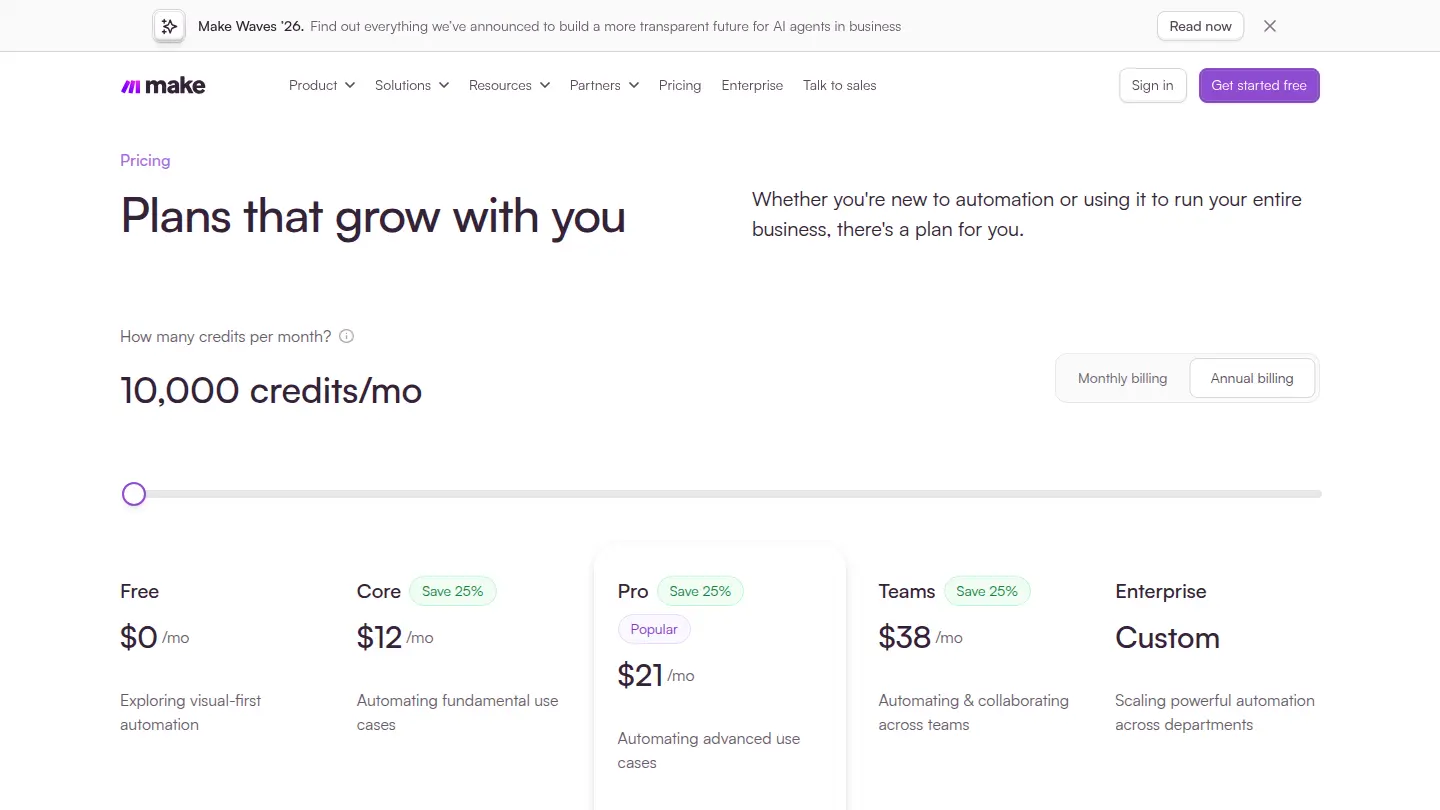
The FAQ names Core, Pro, and Teams as the plans that can auto-purchase 10,000 credits, and it says extra credits can be bought in bundles of 1,000 or 10,000 “at the fixed price defined in your subscription.” It does not print that fixed price in the text we retrieved. It says annual payment in advance is cheaper than monthly. It does not print the two dollar amounts. It offers a start-up plan for teams under 20 employees: 50% off Business. It mentions Enterprise, wire transfer after invoice for enterprise customers, and cards, ACH direct debit, and Google Pay for Core, Pro, and Teams.
Because those dollar amounts were not in the copy we could read, this review does not say what Core costs. Anyone who publishes a monthly price for Make without opening the pricing table is guessing. Open the pricing page and read the number next to the plan before you start a trial that converts.
Downgrading stops scenarios that use higher-plan features. Make says it notifies you before the downgrade completes, charges the card immediately, and starts a new billing cycle. Unused credits transfer and stay valid for the next month or year depending on the term. Cancel anytime, in Make’s words. The paid plan continues until the end of that month or the annual term, then the organization switches to Free, unless the owning user already owns another organization on the free plan. In that case the subscription is removed and you cannot run credits until a plan is added. You can keep the account and log in. If you are testing Make beside another free organization you already own, read that exception before you assume cancel returns you to 1,000 credits.
Who it is for
Make fits someone who already uses two or more apps and can describe the trigger in a sentence: when a row appears, when a form is submitted, when a payment is marked paid. The free 1,000 credits are enough to prove a small scenario if each run is a handful of credits and you do not run it hundreds of times a day. A scenario that iterates a large sheet can burn the month on one run, which is what the FAQ means by “thousands of credits in a single run.”
It also fits a freelancer who wants overnight admin without hiring. Pair it with client-finding only if you actually have the client work. Our Upwork fee note is the hiring side of that decision. The freelancer tools shortlist puts them in one table.
Who should skip it
Skip it if you wanted a video generator. Make does not, on this pricing page, describe itself as a video model. That job is a different subscription. See the Higgsfield note, which also refuses to invent a price. Skip it if your scenario must run every day through a large file and you cannot see a paid price you accept. Stopping at zero credits, with webhooks only queued to a limit, is a real outage for a business process. Skip it if you already own a free Make organization and plan to cancel a second one back to free. The FAQ says that second free plan may not exist. Skip it if you need a human to do the work. Credits do not answer a client’s email with judgment. They move data.
How to decide before you pay
- Write the scenario as a list of actions. Count one credit per read, search, create, update, delete, transform, aggregate, or iterate. Do not count routers and error handlers.
- Multiply by how many times a month it will run. Compare the product with 1,000.
- If you are over 1,000, open the pricing page and write down the dollar price for the smallest plan that covers the estimate. If the page will not show a price without an account, the price is unverified and this article will not invent it.
- Decide whether annual prepay is acceptable. Make says it is cheaper. The size of the discount was not in the FAQ text we read.
- If you are under 20 employees and the 50% start-up offer matters, check the qualification rules on the page. We only saw the offer line, not the application form.
What we could not verify
We could not verify Core, Pro, Teams, or Business dollar prices, the per-bundle price of extra credits, how many third-party apps are available beyond the FAQ’s “more than 1,000,” or whether a given app’s module costs one credit or more. The AI-provider exception is acknowledged and not priced here. We did not run a scenario, so we did not watch a counter move.
Sources
- Make pricing and FAQ, read November 18, 2026.
Make against a video plan, rather than against Zapier, is Make versus Higgsfield for a solo creator.
What is a credit on Make?
Make's pricing FAQ says that as of August 27, credits are the billing unit. Most actions consume one credit. Some AI-provider features use more. Router and error-handler modules are listed as using none.
Does Make have a free plan?
Yes. The FAQ says the free plan includes 1,000 credits a month, which it equates to 1 MB of data storage and one data store. Credits expire at the end of the term.
What happens if you run out of credits?
Make says scenarios stop until credits are added. Webhooks queue up to your queue limit. You can upgrade, buy extra credits in bundles of 1,000 or 10,000, or, on Core, Pro, and Teams, turn on automatic purchase of 10,000 credits.
How much does Make Core cost?
We could not read a dollar price for Core, Pro, or Teams on November 18, 2026. The FAQ names those plans and says annual payment is cheaper than monthly, without printing the amounts in the text we retrieved. Check the pricing page before you subscribe.
Can you cancel Make?
The FAQ says you can cancel anytime. The paid plan runs until the end of the billing period, then the organization moves to Free unless that user already owns another free organization, in which case the subscription is removed and scenarios cannot run until a plan is added.